Organisation Chart Restrictions with Ready Pay's hr Module
If you have hr, you can restrict access based on the Organisation Chart. There are two options; Direct and Multi.
These are set via Roles (Desktop): choose either HR Line Manager – Direct or HR Line Manager – Multi.
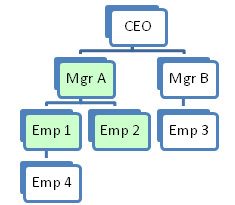
Direct: Allows the user to see themselves and their direct reports only (those incumbents one level below them in the Organisation Chart).
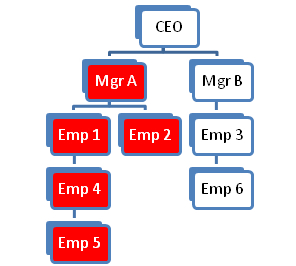
Multi: Allows the user to see themselves and all incumbents who fall under them in the Organisation Chart, regardless of the level.
These are restrictions based on the Organisation Chart.
If you have hr but do not want to apply the Direct or Multi Level options, the Security will be applied based on the other specifications.
You would not usually use both Department and Organisation Chart restrictions.
Illustration of Restrictions based on Organisation Chart:
|
Direct level access policy has been applied to Mgr A: Emp 1 will be able to see: |
Multi level access policy has been applied to Mgr A: Mgr A will be able to see: |
|
EXAMPLE 1:
|
EXAMPLE 2:
|
|
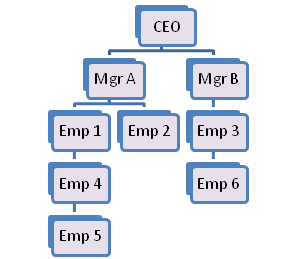
With no Direct or Multi level access policy applied: Level 9 access has been applied to Mgr A: Mgr A will be able to see: |
|
|
EXAMPLE 3:
|
Example 3 would be a good option for setting up the HR Manager. In this way, although organizationally they are on a lower level to the CEO, they will be able to see the CEO’s details, as well as everyone else within the organisation.
It would be a mistake to set them up with Multi Level access (Example 2), as they would not see everyone. |