Fixed Rate Pay Items
If required, you may set a fixed rate for particular pay items. This enables the user to add this item to the payroll or a group of employees' pay items without entering it as a separate amount in each instance.
Fixed Rate Pay items are useful for items such as meal allowances, kilometre allowances and social club fees where a fixed rate is paid for each unit.
Creating a Fixed Rate Pay item
- From the navigator go to Company Definitions > Pay Items.
- Select the category of pay item you want to create the fixed rate for.
 Note that you are only able to create Fixed Rate Pay items within the Taxation, Payment, Deduction, Leave Accrual, Leave Non Accrual and Non Cash pay item category.
- Complete the details for the new pay item or edit an existing pay item. For further information see "Creating a New Pay Item"
- When you reach this Fixed Rates field, complete the necessary information:

- Click on the Fixed Rate Item checkbox to select it.
- In the Item Rate field enter the amount that is to be paid or deducted. in the example above we are setting a Kilometre allowance to pay $0.7650 per Km.
- In the per field the measurement used for this pay item such as units, days, KM, will display automatically based on what has been entered in the Units of Measure filed.
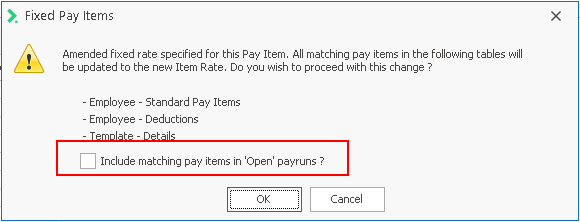
If the Fixed Rate Item checkbox is switched on then an Item Rate must be specified. If changes are made to the Item rate, the system will pop up a confirmation screen as shown below. If you select OK, Ready Pay will process each of the tables referred to, changing the existing rate to the new rate. If you have an open payrun tick the box to enure employees in the payrun are also updated to the new rate.