
Menu
This section allows you to configure the display of menu and sub-menus when you log in to Employee Self-Service Kiosk.
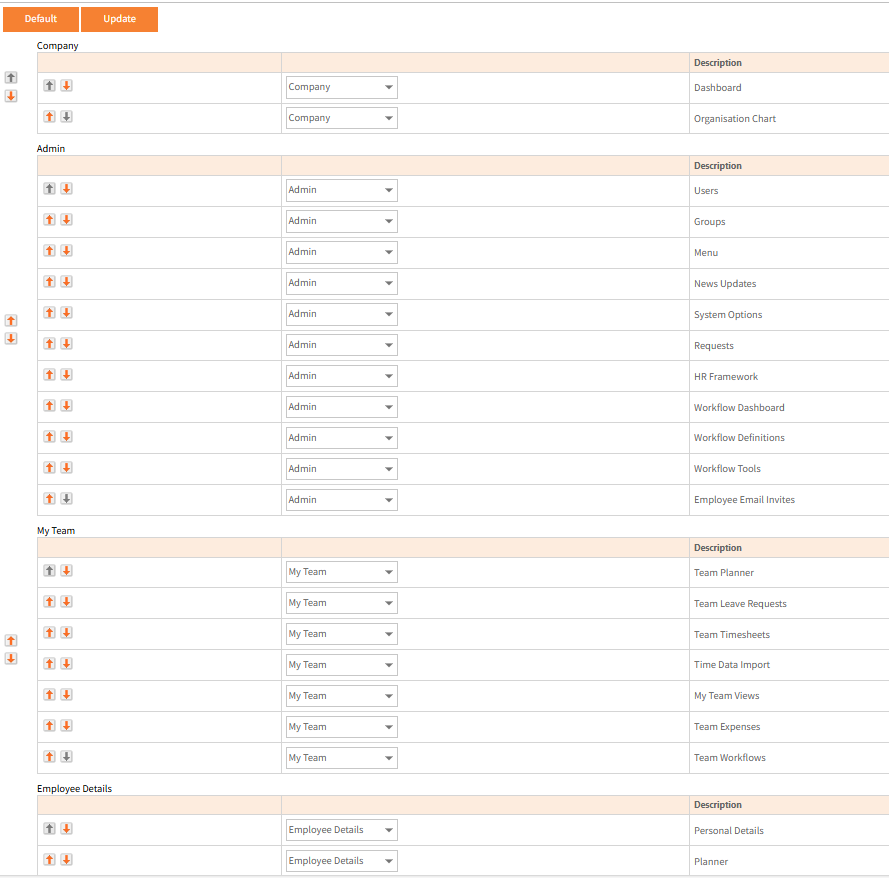
The up/down arrows in the left hand panel allows an entire Menu section to be moved up or down within the menu list.
The up/down arrows within the first white column move the sub-menu (page) up or down within the menu.
The drop-down box in the centre columns allows users to move a sub-menu to a different menu.
For example you might want to move 'Planner' from the Employee Details menu to the Company menu.
Note that moving pages into different menu sections will make it more difficult for Ready Pay support to assist if required.
Click Update to save any changes.
Click Default to return all of the Menu’s and pages back to their default Menu sections and order.
Note that if any user makes display changes in this way, this does not affect their access permissions specified in Groups but will move the page into that new Menu section heading in Groups.